Registration Receipt


Step 1: Please go to the Registration Login heading on our website.
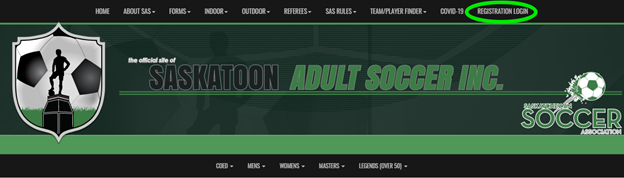
Step 2: Click on Registration Portal to be redirected to the Registration Portal

https://www.rampregistrations.com/login?v3=31526c9470 

RAMP’s registration platform page:
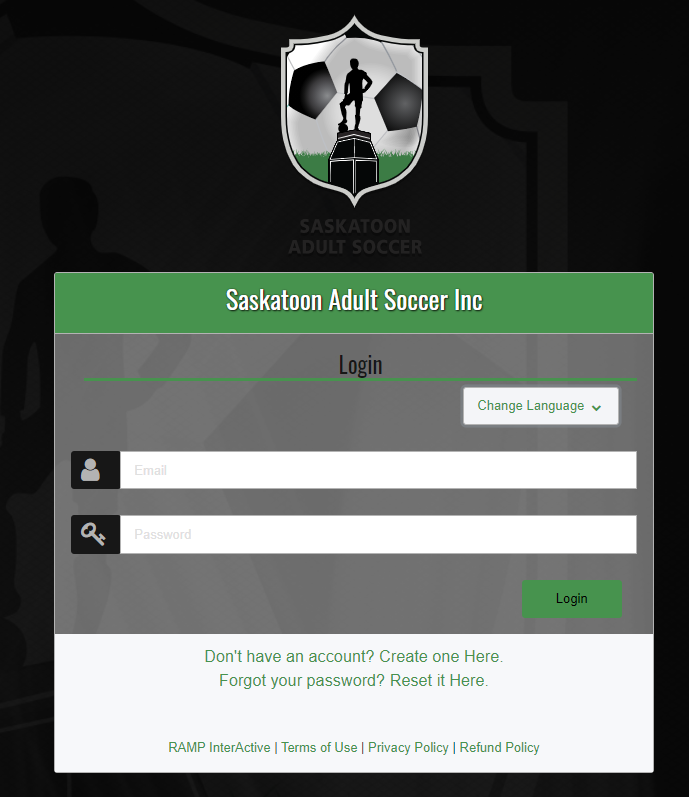
Step 3: Login

Enter your email address and password.

Follow the prompts regarding your password.

(We do not have this information for privacy matters. If you forgot your password, please click on “Reset it Here” to the right of “Forgot your password?”.)
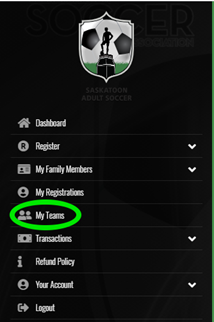
 

Step 4: Click on My Teams or My Registrations.


Step 5: Click on RECEIPT under your the Manage button at the end of the line for the registration receipt you require.


That's it! Your payment and registration details are included.

Upcoming Events


RAMP Registration

Join thousands of association partners using RAMP Registration Solutions.

More Information

RAMP Official Assigning

#1 with Officials...for very good reasons.

More Information

RAMP Websites

Manage your identity from the palm of your hand to the top of your desk.

More Information

RAMP Team App

Keep your coaches, parents, athletes, and fans connected, seamlessly.

More Information